See inside HealthyApp

The work it takes off your desk.

Real screens from the product, with demo clients. Each one is a job you'd otherwise do by hand — or something a client can now do without waiting on you.

The coach's desk

Less admin, fewer misses, faster replies.

Built desktop-first, because that's where coaching gets planned. Every draft the AI writes lands in front of you first — approve it, edit it, or bin it.

Start the day with who needs you

Today sorts your roster by urgency and says why each person is there — six days late on a check-in, no training scheduled, weight stalled. The fix sits on the row: remind them, plan their training, or message them.
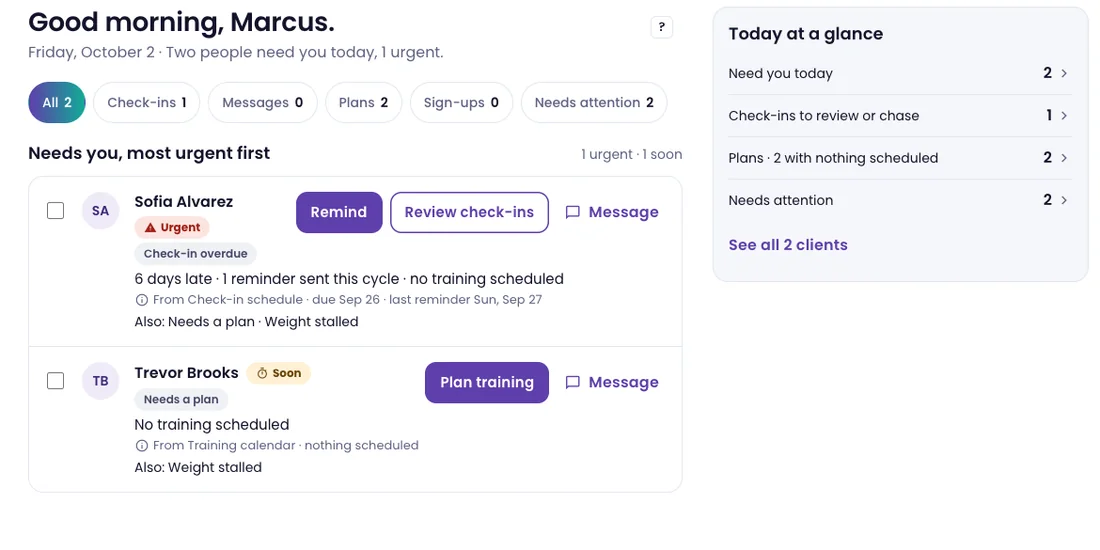
Coach Today screen: Good morning, Marcus — two people need you today. Queue filters for check-ins, messages, plans, sign-ups and needs attention; Sofia Alvarez marked urgent, six days late, with Remind and Review check-ins; Trevor Brooks needs a plan, with Plan training; a Today at a glance panel

Review a check-in without starting from zero

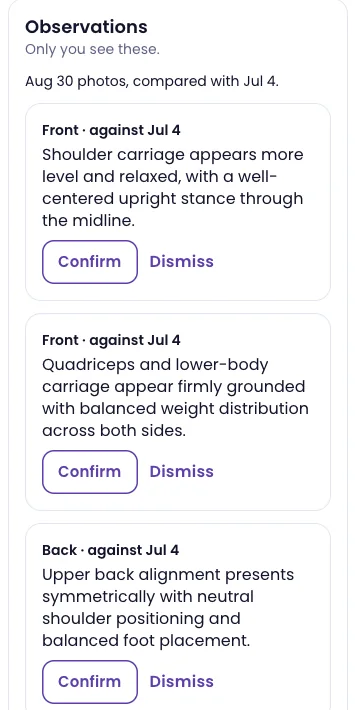
Vera reads the photos, answers and video a client sent, plus the week behind them, and writes you a short summary. Photo observations compare against the last check-in — and only the ones you confirm make it into the next video, in your words.
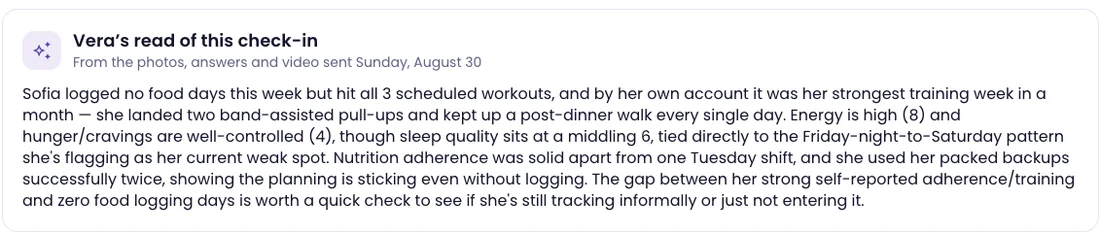
Vera's read of this check-in: a paragraph summarising the client's week from her photos, answers and video — all three workouts done, energy high, sleep middling, a gap between self-reported adherence and food logging worth a quick check
Observations panel, marked Only you see these: front and back photos compared with an earlier check-in, each observation with Confirm and Dismiss
  • Observations are visible only to you, with Confirm or Dismiss on each — dismissed ones aren't repeated
  • Coaching cues and trend language — no numbers on the body, no composition estimates
  • Image analysis switches off for any one client
  • A rough week — two or more low scores — flags the check-in and shows up on Today

Every client page opens with a read

Open anyone and Vera's summary of their last two weeks is at the top, refreshed when their data changes, beside what needs you. Spot something worth acting on? Press Tell Vera and say it — she turns it into a plan, and each change waits for your approval. Undo is one tap.
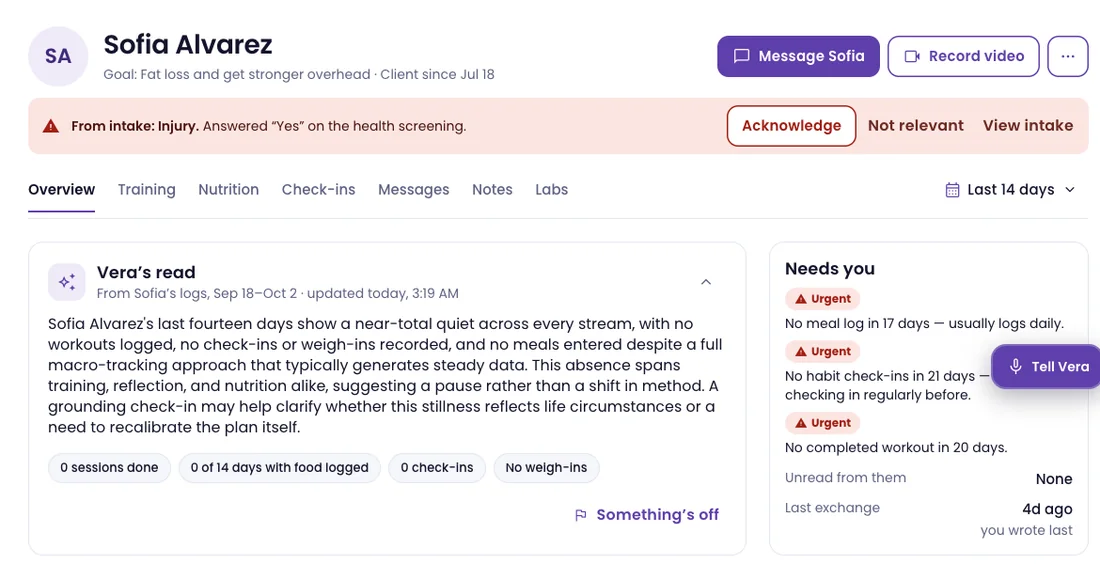
Client page for Sofia Alvarez: an intake flag to acknowledge, Vera's read of the last fourteen days with the signals it used, a Needs you list of urgent items, and the Tell Vera button

Check-in videos that sound like you

Add a few notes on how you coach and every drafted script reads them. Edit a draft and the next one learns from the change. This page shows what the AI has picked up about your voice — phrases you reach for, words you'd never say — so you can correct it. Nothing renders or sends until you approve.
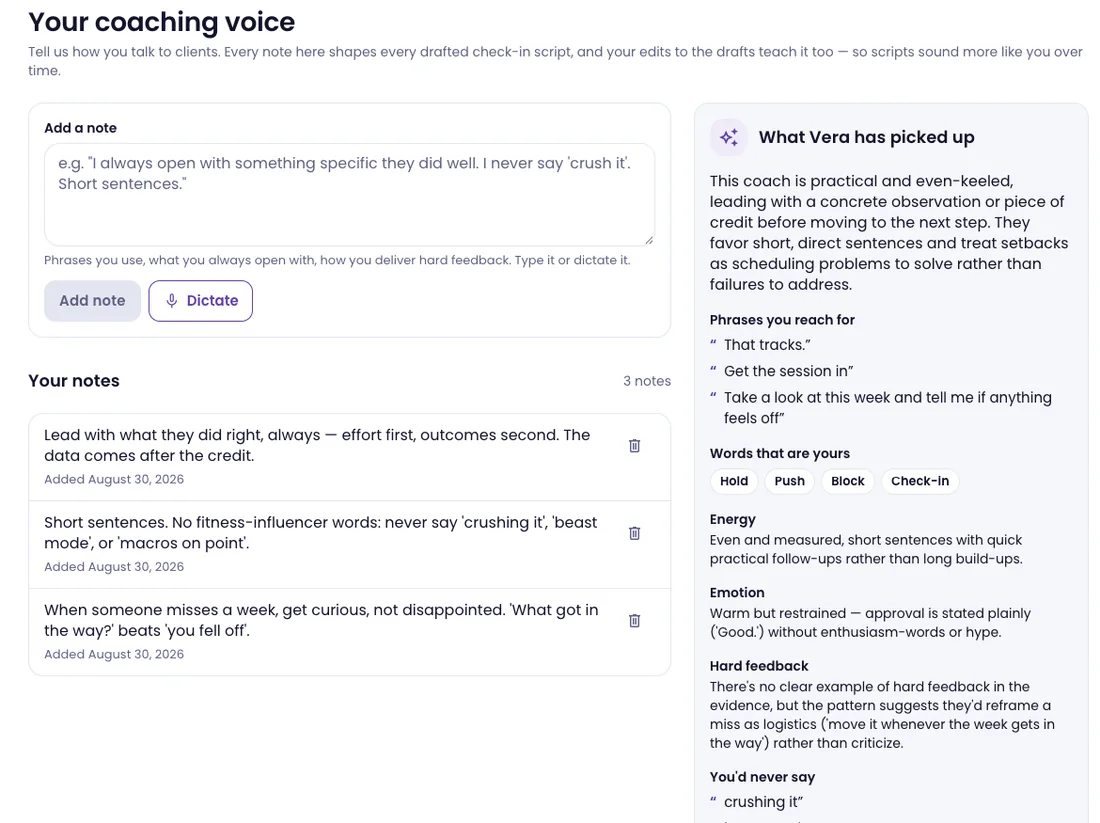
Your coaching voice: the coach's own notes on how they talk to clients, and What Vera has picked up — a summary of their style, phrases they reach for, words that are theirs, energy, emotion, how they give hard feedback, and what they'd never say

Reply with the whole picture beside you

Each conversation sits next to Vera's read of the client's last four weeks — training, check-ins, food and weight — so you answer from the facts, not from memory. Ask Vera sits on top for the questions you'd otherwise dig for: "who's been waiting longest?"
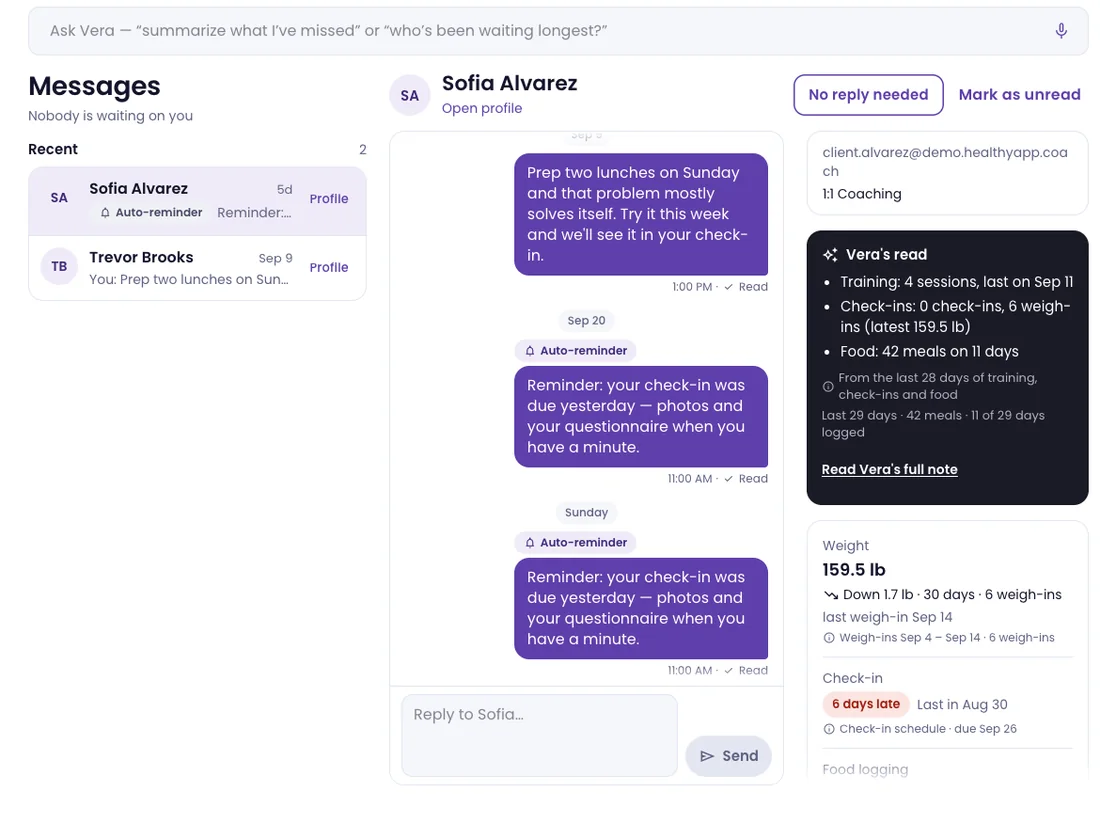
Coach messages: the Ask Vera bar, a client thread with read receipts and automatic check-in reminders, and a side panel with Vera's read of the last 28 days, latest weight and check-in status

Macro targets with the math done

Type the macros and the calories compute as you go; fiber gets a suggested value. You see the exact message the client will get before it sends, and the new target lands on their phone when you save.

  • Day types — high, low, refeed — on a weekly rotation
  • Choose how they track: just photos, a meal plan, or the full kit
  • Hide the numbers entirely for a client who shouldn't see them
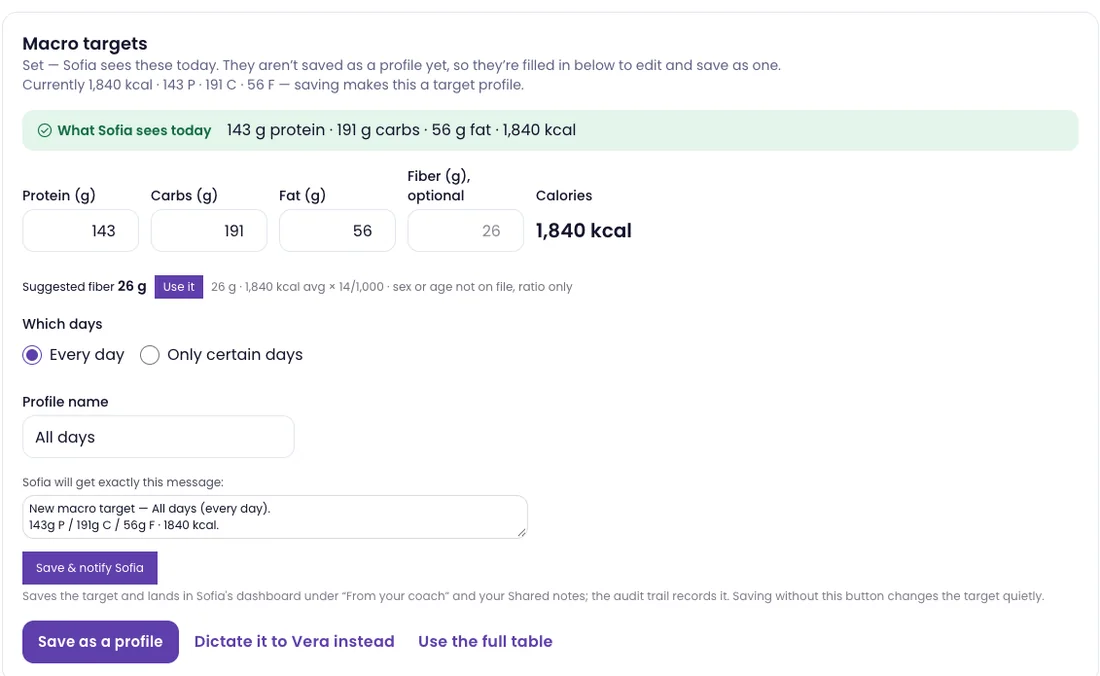
Macro targets editor: what the client sees today, protein, carbs, fat and optional fiber fields with calories computed at 1,840 kcal, a suggested fiber value, which days it applies to, and an editable preview of the exact message the client will receive

Build a program once, run it for everyone

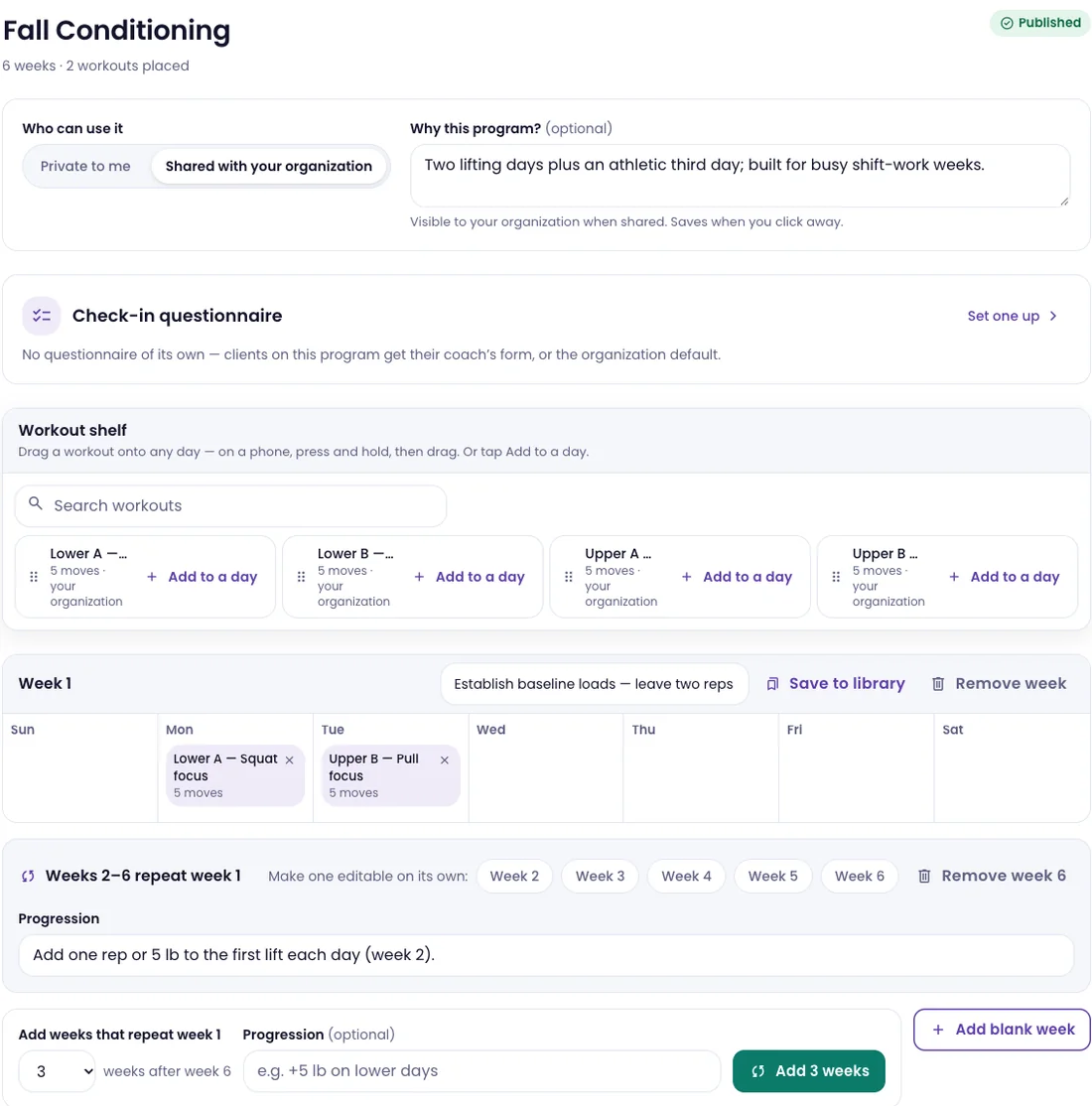
Weeks are a grid you drop workouts onto. Repeat week one with a one-line progression note, break any week out for a deload, save weeks to your library and share them with your team — or start from one of twenty prebuilt programs — HYROX race prep included — most with their own check-in form.
See the twenty programs

Program builder for a six-week program shared with the organization: a why-this-program note, its check-in questionnaire, a workout shelf with Add to a day, week one's Sunday-to-Saturday grid, and weeks two to six repeating week one with a progression note

Off the desk, still on top of it

The same Today queue on your phone, with Ask Vera a tap away — so a client who needs you between sessions isn't waiting until you're back at a laptop.
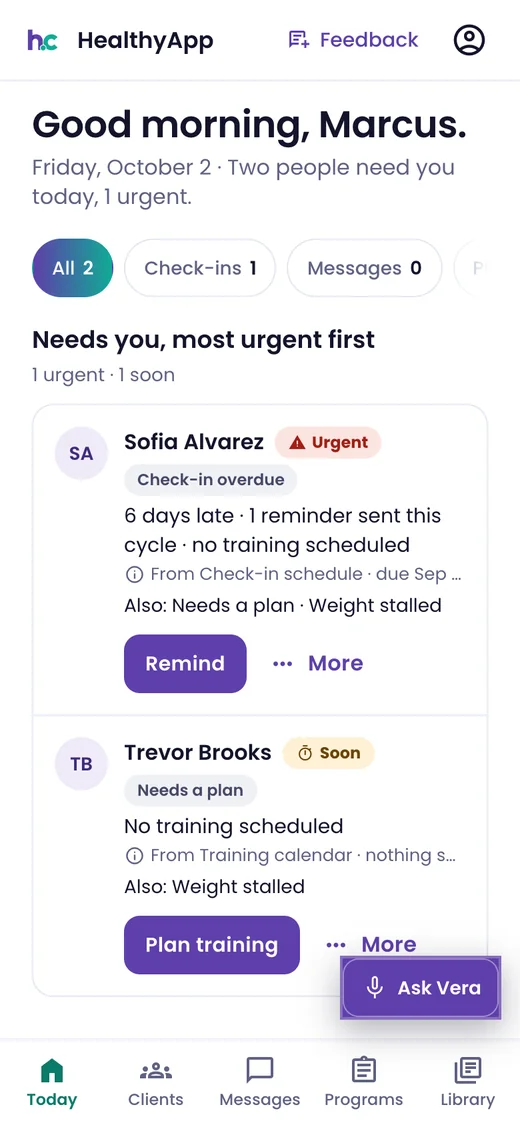
Phone: the coach's Today queue — two people need you, Sofia urgent and six days late with Remind, Trevor needing a plan with Plan training, and the Ask Vera button

The client's phone

Your coaching, in their pocket all week.

Phone-first and under your brand. Every screen is built so a client can do the next thing without messaging you to ask how.

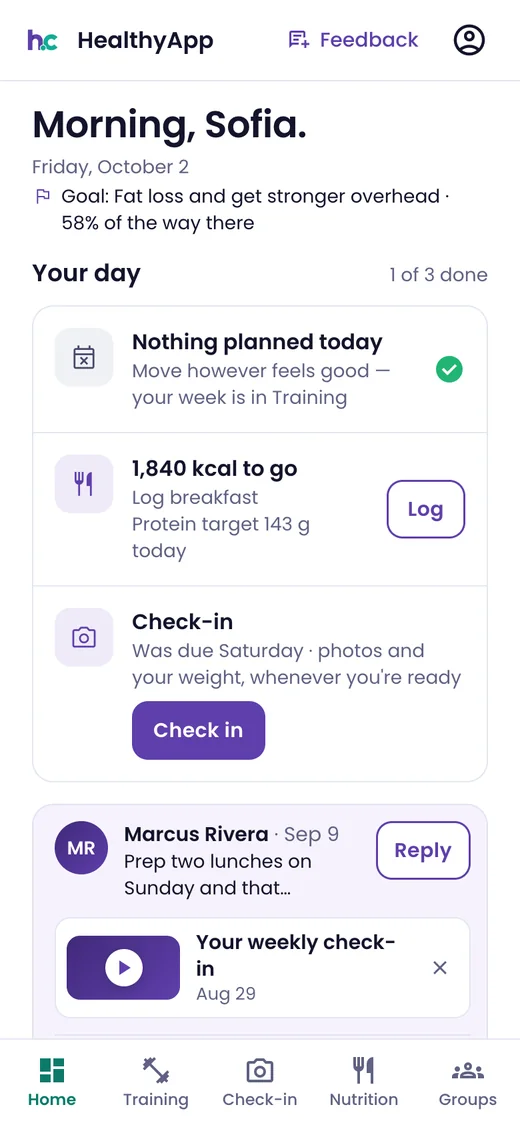
Phone: client home — Morning, Sofia; her goal and progress, today's plan, calories to go, a check-in prompt, and her coach's latest message with this week's check-in video

Home opens on you

Today's plan, your latest message and this week's check-in video, on the first screen they see.

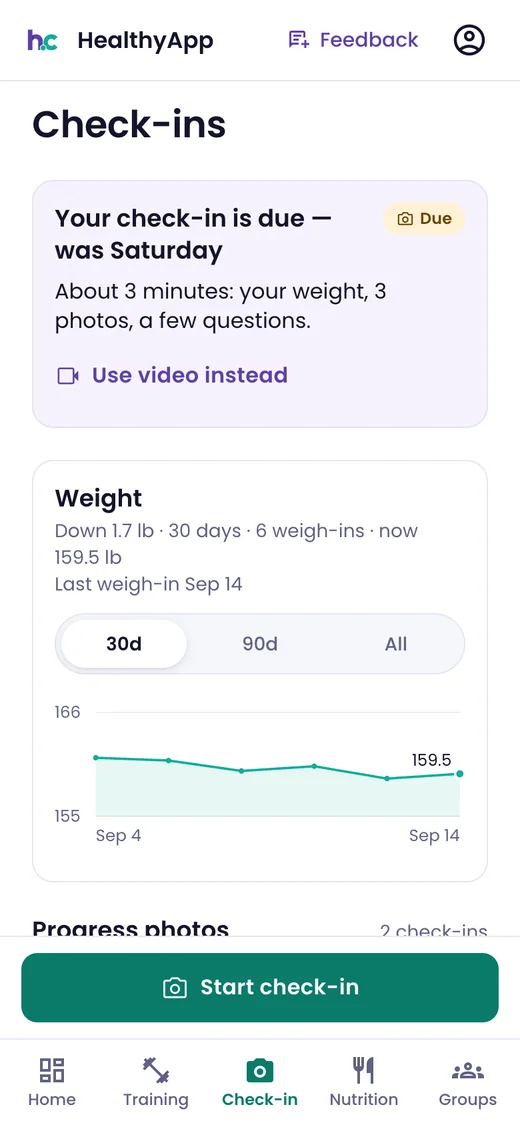
Phone: check-ins — this week's check-in due, about three minutes for weight, three photos and a few questions, Use video instead, and a 30-day weight trend

A check-in in about three minutes

Weight, three photos and a few questions — or a quick video instead. You see it the moment they send.

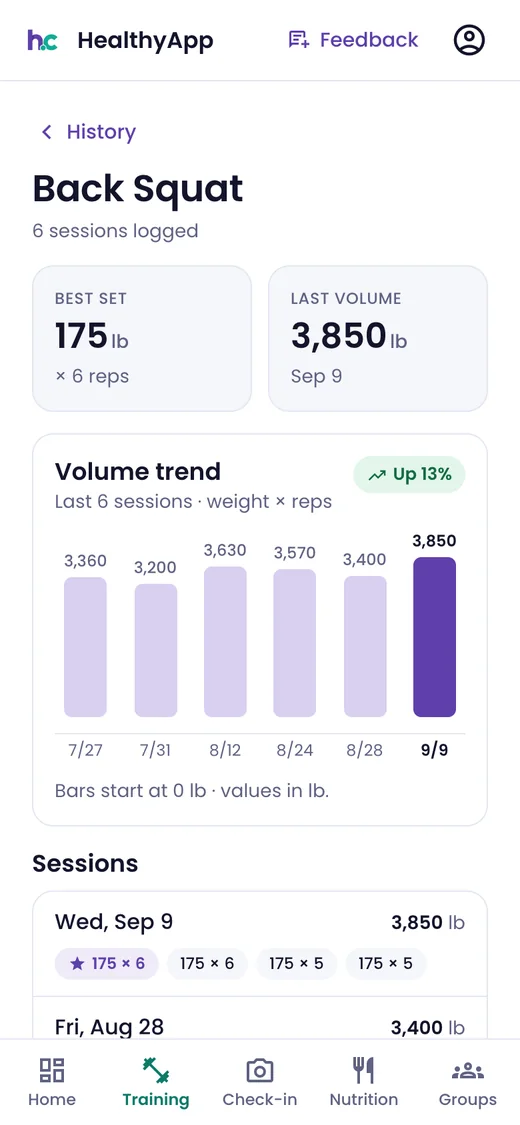
Phone: Back Squat history — six sessions logged, best set 175 lb for 6, last volume 3,850 lb, and a six-session volume trend up 13%

Training that remembers

Guided sessions with rest timers and last time's numbers on every set. Each lift keeps its own history and trend.

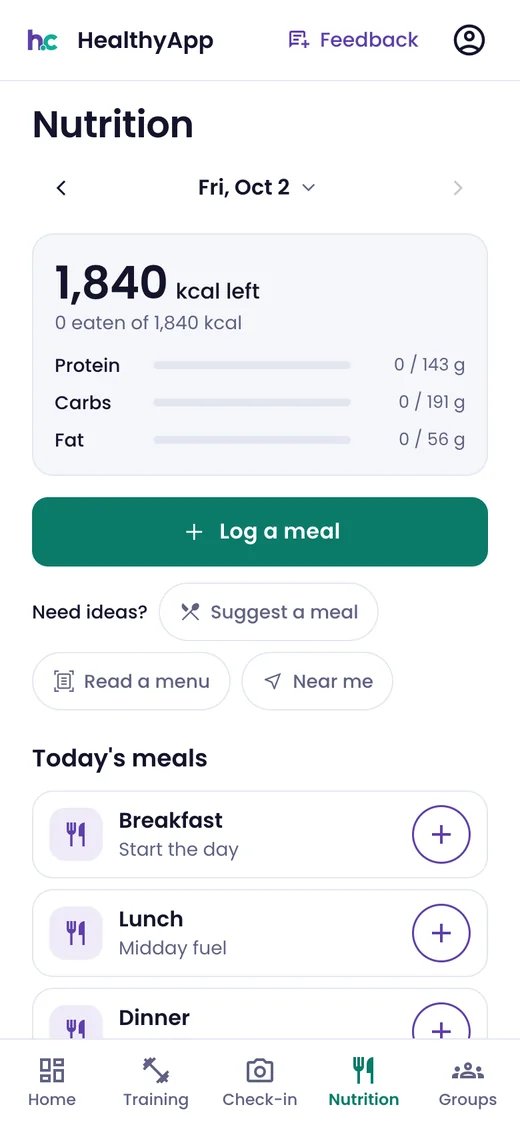
Phone: nutrition — 1,840 kcal left, protein, carbs and fat against target, Log a meal, Suggest a meal, Read a menu, Near me, and today's meals

Food logged in seconds

What's left for the day against your targets. Log by photo, voice, barcode or search — or ask for a meal idea and read a menu.

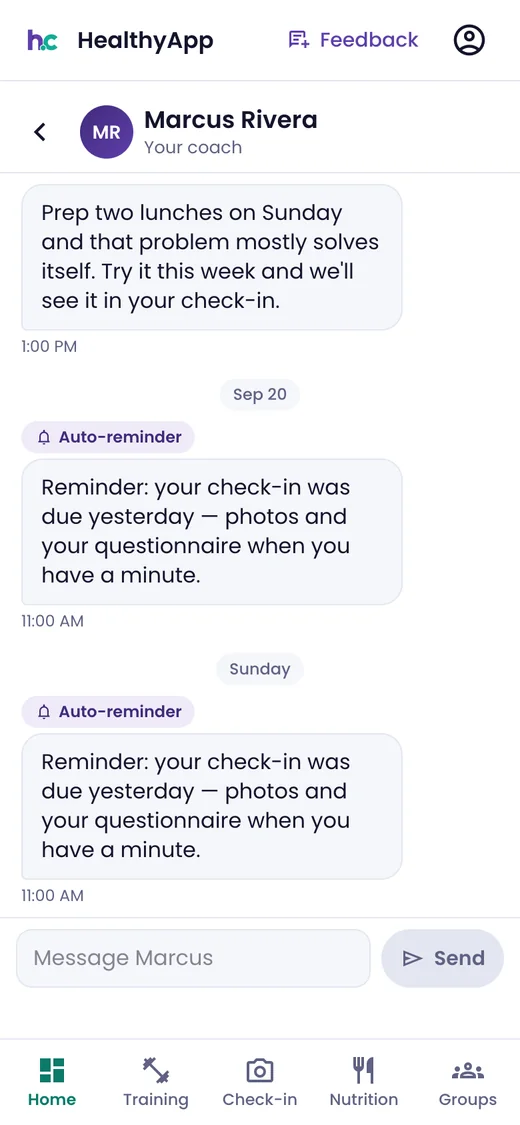
Phone: the client's thread with coach Marcus Rivera — a coaching note about prepping lunches and automatic check-in reminders

A direct line to you

One thread with their coach, plus a text when you've left something unread — with quiet hours respected.

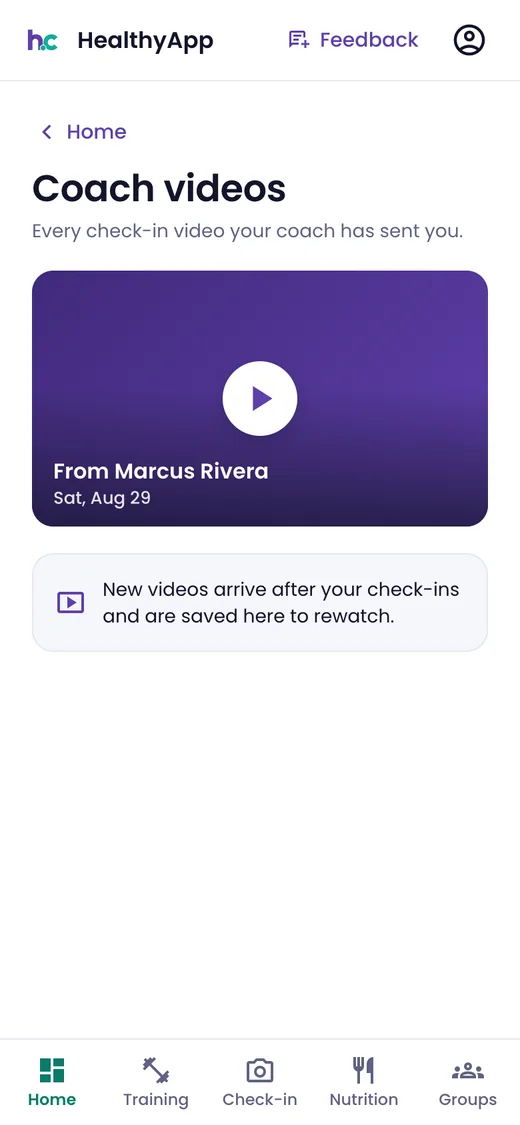
Phone: Coach videos — every check-in video the coach has sent, with the latest from Marcus Rivera ready to play

Every video you've sent, kept

Check-in videos collect in one place to rewatch, so your advice doesn't get lost in a thread.

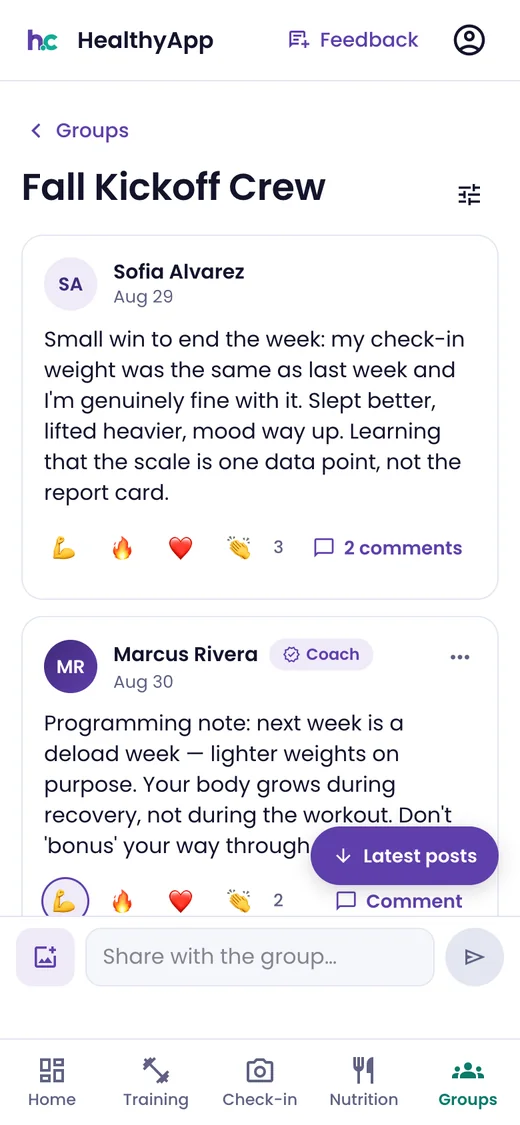
Phone: a group feed — a client's post about a good week with reactions and comments, and the coach's programming note about next week's deload

Groups and challenges

A private feed for a cohort or the whole gym. Challenges score showing up — workouts, check-ins, logged days — never weight lost.

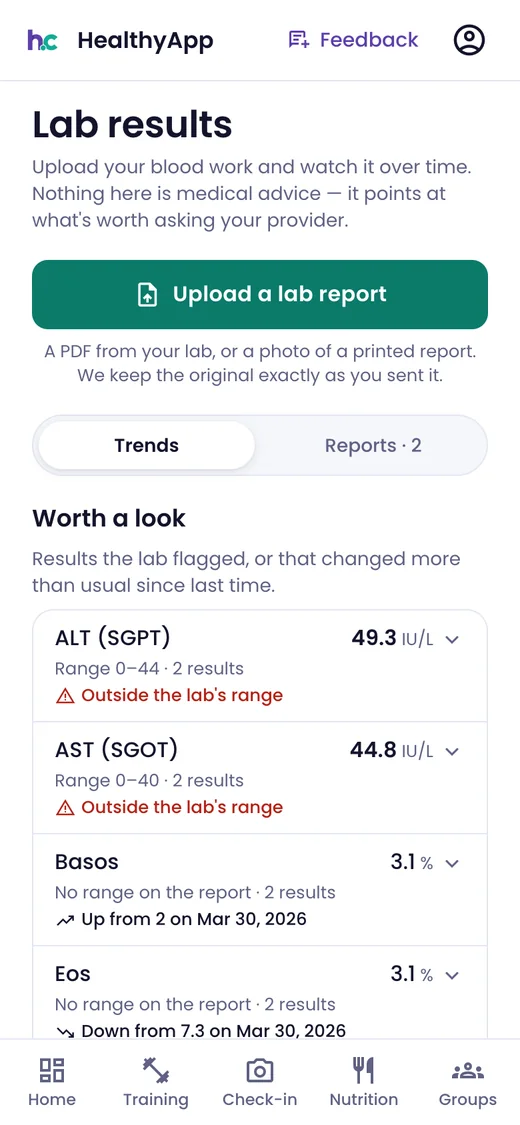
Phone: lab results — upload a lab report, a trends view, and markers worth a look flagged as outside the lab's range

Lab results over time

Clients upload a lab report and follow each marker across results, with anything outside the lab's range flagged. Not medical advice — a pointer to what's worth asking their provider.

The owner's view

Run it like a company, not a calendar.

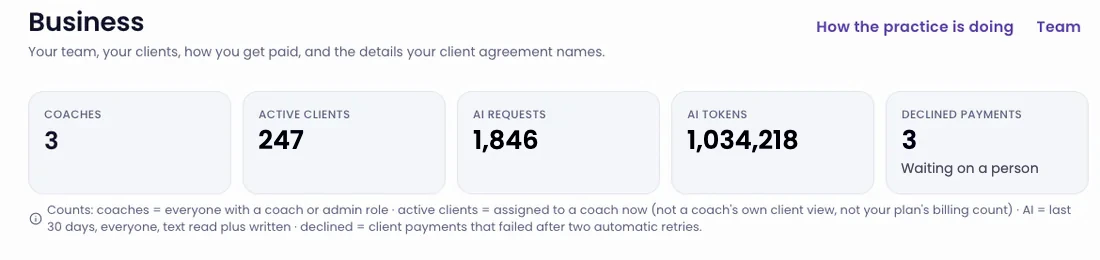
The whole practice on one page

Coaches, active clients, AI usage and declined payments — each with a plain note on exactly what's counted, so the numbers never need explaining.

Owner's Business page: tiles for coaches, active clients, AI requests, AI tokens and declined payments, with a note defining each count

Grow the team without losing a client

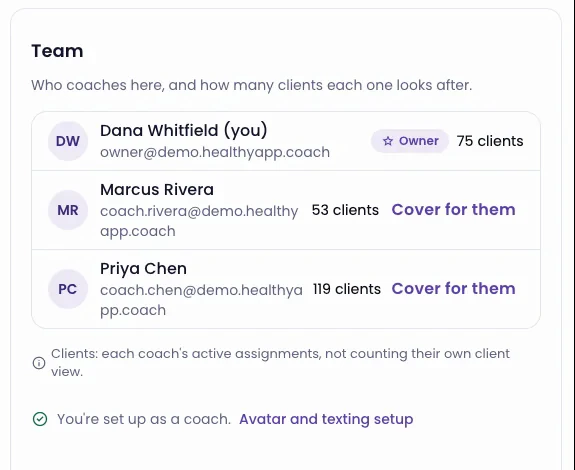
Invite a coach with a link by text. Each one gets their own texting number and their own voice-learning. Reassign clients with their history intact — and when a coach is away, cover for them as them, with a banner and a full audit trail.

Team card: the owner and two coaches with their client counts, a Cover for them link beside each coach, and Avatar and texting setup

Your brand on every screen

Each business lives at its own address — yourname.healthyapp.coach — with its own logo and colour. No logo yet? Clients see your monogram in your brand colour.

Every client stays yours

Clients join by your invite and live under your brand. There's no marketplace showing them other coaches.

Be your own first client

Flip to the client view and use the app exactly the way your clients do.

Give every client your full attention.

Keep your life.

We're onboarding coaches in small groups so every avatar and roster gets set up properly. Tell us about your practice and we'll come to you in order.

Join the waiting list

We're onboarding coaches in small groups. Tell us about your practice and we'll come to you in order.

No contract, no card. We'll only contact you about getting set up.